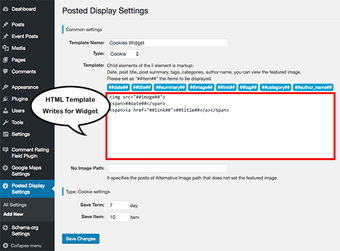
WordPress Posted Display, developed by miiitaka, is a WordPress plugin that exposes configurable post lists for pages and sidebars to improve content discovery. The plugin renders recent, random, or selected posts through dedicated widgets and a [wp-posted-display] shortcode, with filters by category, tag, or explicit post IDs and custom post type support. It includes post thumbnail support, customizable output templates, exclusion controls, and ordering rules. Site owners, bloggers, and developers who need precise, lightweight control over how posts are highlighted find it practical.
Surfaces curated post lists through widgets and a shortcode
The plugin integrates with the WordPress core widget system and the shortcode API to place post lists in sidebars, pages, or post content. It can show recent, random, or specific posts and supports custom post types and post thumbnails. Display modes include:
Recent posts
Random selection
Explicit post ID lists
This makes it straightforward to add focused lists where users expect navigation cues.
Gives fine-grained control over which posts appear
Filtering options let administrators select posts by category, tag, or specific post IDs, and exclude particular entries to avoid duplication. The plugin provides numeric limits and multiple ordering modes, including random, date-based, and ID-based sorting. Customizable output templates match the site’s design, and basic displays require no coding, making the tool accessible to editors and site managers without developer intervention.
Has a small performance footprint suitable for most sites
The plugin advertises a highly lightweight footprint and does not significantly affect site loading speeds, which keeps content lists practical for live pages. It requires a self-hosted WordPress installation and standard PHP environments, so compatibility aligns with typical hosting. For post thumbnails to appear, the active theme must support featured images; otherwise the list falls back to text-only entries.
Is straightforward to deploy but advanced styling needs theming skills
Deployment uses either a dedicated widget or the [wp-posted-display] shortcode inside page and post content, so editors can place lists without editing theme files. The developer maintains the plugin within the WordPress ecosystem, and the plugin supports custom post types for varied content. Site teams that need bespoke markup should plan to edit output templates or involve a developer for tighter styling control.
Practical choice for targeted post placement
The plugin suits site owners and bloggers who want focused control over content exposure across a self-hosted site. The developer’s utility-focused approach keeps the plugin lightweight and easy to add into existing pages. Administrators who require deeper layout or markup changes should expect to edit the plugin’s output templates or enlist a developer to align lists with complex theme structures.
Pros
Offers both widget and shortcode display methods
Supports custom post types and post thumbnails
Customizable output templates and exclusion controls
Cons
Thumbnails appear only if the active theme supports featured images
Laws concerning the use of this software vary from country to country. We do not encourage or condone the use of this program if it is in violation of these laws. Softonic may receive a referral fee if you click or buy any of the products featured here.